Takeaways
Your wallet, exchange, or fintech app needs a fiat on-ramp, and probably an off-ramp too. The open question is which on-ramp integration type should you go for?
Here is the short answer:
- Choose our Widget when speed to market matters most
- Choose our Whitelabel API when you want full control of the interface and you already run backend infrastructure
- Choose the Semi-Widget when you want a native journey but do not want card data in your PCI scope
This guide compares all three paths on the criteria that actually decide the build, from UI control and PCI scope to KYC ownership, time to market, and long-term maintenance.
Three ways to build a crypto on-ramp integration
We offer three ways to integrate a crypto onramp:
- The Widget is a hosted interface you embed
- The Whitelabel API gives you the full journey, called from your backend
- The Semi-Widget keeps everything native except the card step
Each one trades speed against control differently, and the right pick depends on your PCI appetite and timeline.
|
Capability |
Widget |
Whitelabel API |
Semi-Widget |
|
On-ramp (buy) |
Yes |
Yes |
Yes |
|
Off-ramp (sell) |
Yes |
No |
No |
|
Bank transfers (ACH, SEPA, Wire) |
Yes |
Yes (fully API) |
Yes |
|
Open banking (EU, UK) |
Yes |
Yes |
Yes |
|
Cards and Apple Pay |
Yes |
Headless, needs Auth Reliance |
Yes, we host the card step |
|
Google Pay |
Yes |
Headless, needs Auth Reliance |
No |
|
KYC Reliance (reuse KYC) |
n/a (we host KYC) |
Yes (non-US) |
Yes (non-US) |
New to the model? Our primer on how a crypto on-ramp works covers the basics.
|
Dimension |
Transak Widget |
Whitelabel API |
Semi-Widget |
|
Who owns the UI |
We do |
You do |
You, except the card step |
|
Time to integrate |
Fastest (hours to days) |
Longest |
Medium |
|
UI and branding control |
Low (URL parameters and customization) |
Full |
High (native except the card step) |
|
PCI card scope |
None, we host it |
Yes, if you capture cards headless |
None, we host the card step |
|
KYC ownership |
Ours, in the hosted UI |
Yours via API, we verify |
Yours via API, we verify |
|
Engineering and maintenance |
Lowest |
Highest |
Medium |
|
Best for |
Speed to market |
Full control with your own PCI environment |
Native UX without the PCI burden |
1. The Transak Widget is your fastest path to live
The Transak Widget is our hosted, prebuilt interface. You embed it through an iframe, our JavaScript SDK, Android, iOS, and React Native SDKs, or a web redirect. We own the UI, the PCI scope, and the KYC flow. You customize through URL parameters and widget settings.
Need a working crypto on-ramp fast? This is it.
The handoff is now session-based, which is more secure than pasting raw parameters into a URL. You create a partner access token with POST /partners/api/v2/refresh-token using your API key and secret, then call POST /api/v2/auth/session with your widget parameters. The response returns a widgetUrl that is valid for five minutes with a single-use sessionId.
Our guide on how to generate a widget URL and test different scenarios walks through the parameters, including productsAvailed, fiatCurrency, cryptoCurrencyCode, network, walletAddress, and partnerOrderId.
2. The Whitelabel API gives you full control
The Whitelabel API hands you the entire journey, from auth and KYC to quotes, order creation, and tracking, with no third-party UI on any screen. You build everything on our payment API, called server-to-server from your backend with your public IP addresses whitelisted. It is the most control we offer.
The core flow spans our REST APIs, webhooks, and websockets, and developers can check every step against our API integration documentation and our white-label sample implementation.
- Authenticate the user. Send User OTP, then Verify User OTP, which returns a data.accessToken valid for 30 days.
- Fetch a quote. Get Quote is public and returns a quoteId with conversionPrice, cryptoAmount, and the fee breakdown.
- Run KYC keyed to the quote. Get KYC Requirement returns a kycType of Simple, Standard, or Enhanced. You then Patch User Details, Update Purpose of Usage, and submit each form in the sequence given. Standard and Enhanced require document upload and liveness through our hosted KYC step.
- Create and confirm the order. For bank transfer, this is fully API driven. Get User Limits, Create Order with the quoteId, paymentMethod, and walletAddress, then Confirm Payment and Get Order by ID to track.
- Listen for updates. Order status arrives over webhooks and websockets.
Note that, as of July 2026, the Whitelabel API does not support off-ramp, NFT Checkout, Virtual Account Payments, or Transak Stream Off-Ramp, and KYC Reliance is not available for US KYC users.
Further, if you collect card data yourself, you are in PCI DSS scope, and Auth Reliance is the feature that passes your authenticated user to us server-to-server so headless cards, Apple Pay, and Google Pay work. If you do not want that scope, the Semi-Widget exists for exactly this reason.
Here is how the three paths line up on specific capabilities.
3. The Semi-Widget fits most wallets
The Semi-Widget is our recommendation for most wallets. You run quotes and KYC natively through the API, then hand the user to a Transak-hosted page for the card or Apple Pay step only. A one-time token carries their identity and KYC state, so they never log in again. You keep a native experience and stay out of PCI card scope.
Your backend calls requestOtt(), which returns an ottToken that expires in five minutes and works once. You build the hosted URL with that token plus your parameters, then track the result over a websocket or by polling Get Order by ID.
This is why we call it the best of both. Your user buys crypto with Apple Pay or a card inside what feels like your app, you avoid the PCI audit, and you skip building card capture from scratch.
The one constraint to plan around is Google Pay, which runs through the hosted Widget or a headless Auth Reliance build rather than the Semi-Widget.
How KYC Reliance and Auth Reliance cut friction
Two features cut onboarding friction regardless of the path you choose.
- KYC Reliance reuses a user's completed verification so we do not re-verify them
- Auth Reliance passes your authenticated user to us server-to-server so headless users never log into Transak
Both are available to Whitelabel API partners, with one caveat for US users.
KYC Reliance
KYC Reliance works through Sumsub token sharing. You configure a Sumsub Application Level named "Transak KYC Reliance" with identity document and selfie enabled, receive a donor access token from us, and add Transak as a recipient in your Sumsub dashboard.
The user completes KYC once. We then access the verified data, including name, date of birth, mobile, address, ID documents, and Advanced Liveness. It is not supported for US KYC users.
Auth Reliance
Auth Reliance is about login, not identity. Your backend passes credentials with the x-access-token and x-user-identifier headers, after calling Onboard User first with POST /api/v2/user/onboard. Skip that step and you get error 1023, "User not found."
It supports bank transfers, open banking, and headless cards, Apple Pay, and Google Pay.
What the MetaMask Deposit integration teaches
MetaMask built a fully native Deposit experience on our white-label stack where it renders its own UI, our API calls are brokered by its backend, and the only hosted surface is the card or Apple Pay page via a one-time token.
Also Read: How MetaMask Launched ‘Deposit’ using Transak’s White-Label APIs
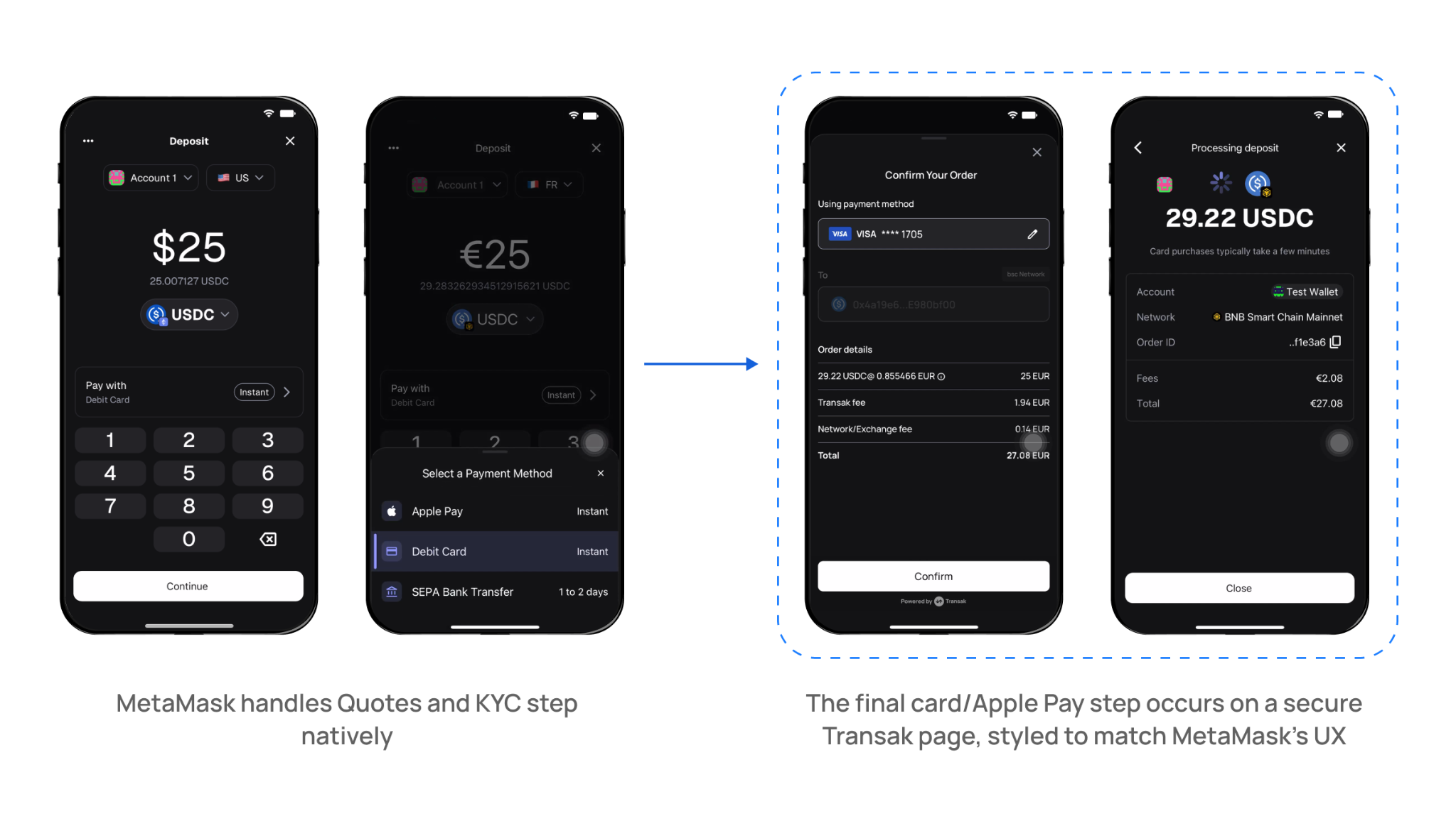
A few architecture choices:
- Native UI, backend-brokered calls. MetaMask built its own screens for region, currency, payment method, and crypto selection, passing them as parameters. The wallet address is passed in to skip a step.
- The wallet stays out of scope. MetaMask never handles user PII and never touches the flow of funds. Auth, KYC, and payment all run through us.
- Semi-widget for the money step. Quotes and KYC are native. Only the final card or Apple Pay step happens on our hosted page, using auth sharing and one-time tokens.
- Named bank accounts. Every user gets a dedicated IBAN or ACH account, which removes payment memos, alongside named IBANs and near 1:1 stablecoin on-ramping for assets like USDC and USDT.
The compliance point underneath all of it is the reason wallets pick this model. We serve 600+ apps across 64+ countries, covering 136+ crypto assets on 45+ networks. We own the full compliance stack, including KYC, AML, fraud prevention, and local payment licensing. MetaMask shipped a centralized-exchange-grade buy flow without becoming a payments company.
Conclusion
The default for most wallets is the Semi-Widget. You get a native journey, you stay out of PCI scope, and your users authenticate once.
If you need control of every screen and you already run the PCI and compliance infrastructure, build against the Whitelabel API. If you need something live this week, embed the Widget today and deepen the integration later.
Open our API integration documentation, map your flow to one of the three paths, and reach out when you are ready to whitelist your first IP.
Frequently asked questions
Can I keep users fully inside my app with the Widget?
The hosted Widget embeds inside your app, but the interface is ours. For a fully native look where users never leave your screens, use the Whitelabel API for a headless build, or the Semi-Widget, where only the card or Apple Pay step happens on a Transak-hosted page.
Do I take on PCI scope with the Whitelabel API?
Only if you capture card data yourself. Bank transfer and open banking flows over the API keep you out of PCI scope. Headless card capture puts you in PCI DSS scope and requires Auth Reliance. To avoid scope entirely while still taking cards, use the Semi-Widget.
What exactly is the semi-widget flow?
You handle quotes and KYC natively through our API, then hand the user to a Transak-hosted page for the card or Apple Pay step only. A one-time token, valid for five minutes and single use, carries their identity and KYC state, so they complete payment without logging in again.
How long does each integration take?
The Widget is fastest, often live the same day, because we own the UI and KYC. The Semi-Widget takes longer, since you build the native journey around one hosted step. The full Whitelabel API is the largest build and the longest timeline, with the most control.
Can I reuse the KYC my users have already completed?
Yes, through KYC Reliance. If your users verified with Sumsub, we reuse that verification through token sharing instead of re-checking name, address, ID documents, and liveness. KYC Reliance is available to Whitelabel API partners and is not supported for US KYC users.
Which integration does MetaMask use?
MetaMask uses the Semi-Widget on our white-label stack. It renders a fully native Deposit UI, runs quotes and KYC through its backend, and hands users to a Transak-hosted page only for the card or Apple Pay step, using auth sharing and one-time tokens.